How Percona ClusterSync for MongoDB works
Percona ClusterSync for MongoDB (PCSM) is a binary process that replicates data between MongoDB deployments in real time until you manually finalize it. You can also make a one-time data migration from the source to the target with zero downtime.
You operate with Percona ClusterSync for MongoDB using the set of commands or API calls. Depending on the request it receives, Percona ClusterSync for MongoDB has several states as shown in the following diagram:
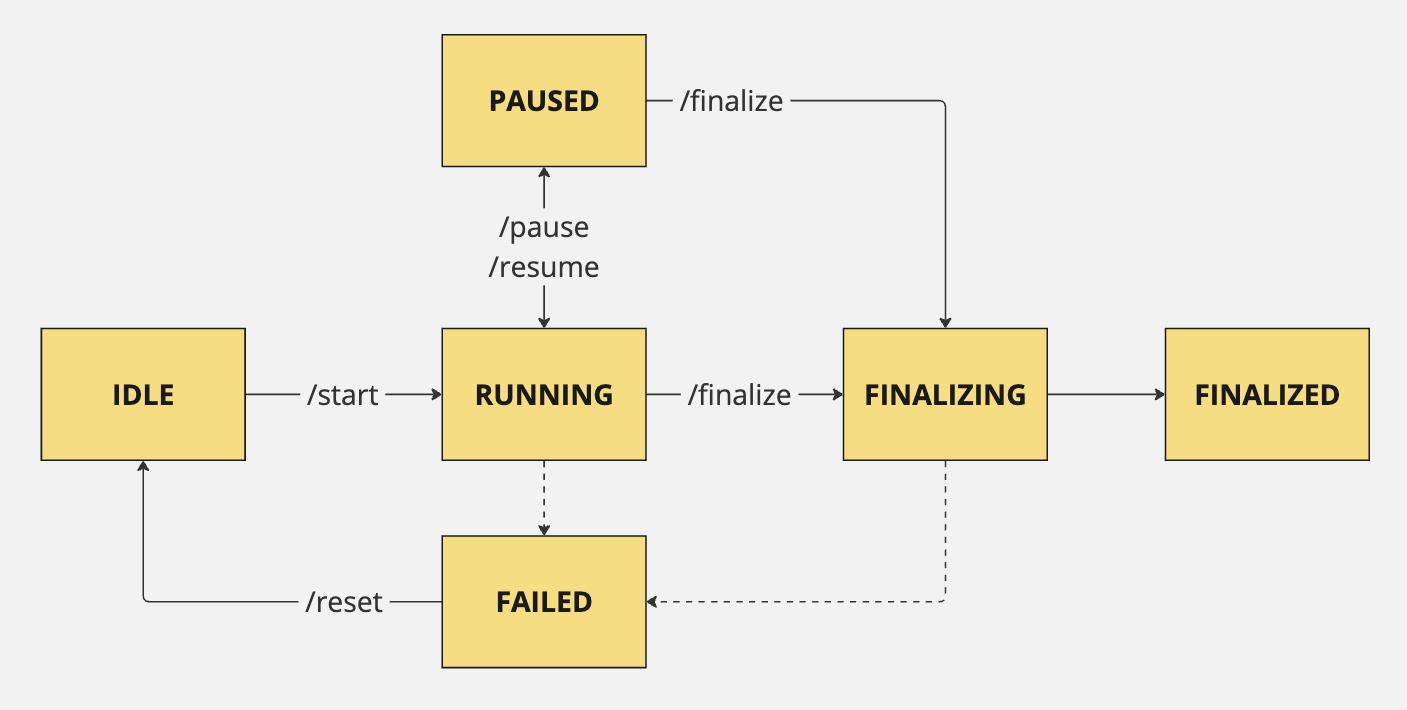
- Idle: PCSM is up and running but not migrating data
- Running: PCSM is replicating data from the source to the target. PCSM enters the running state when you start and resume the replication
- Paused: PCSM is not running and data is not replicated
- Finalizing: PCSM stops the replication and is doing final checks, creates indexes
- Finalized: all checks are complete, data replication is stopped
- Failed: PCSM encountered an error
Usage scenario
Now, let’s use the data migration from MongoDB Atlas to Percona Server for MongoDB as an example to understand how PCSM works.
You run a MongoDB Atlas 8.0.8 deployed as a replica set. You need to migrate to Percona Server for MongoDB 8.0.8-3, also a replica set. You have a strict requirement to migrate with zero downtime; therefore, using logical backups with Percona Backup for MongoDB is a no-go.
A solution is to use Percona ClusterSync for MongoDB. MongoDB Atlas is your source. An empty Percona Server for MongoDB replica set is your target. Data migration is a resource-intensive task. Therefore, we recommend installing PCSM closest to the target to reduce the network lag as much as possible.
Create users for PCSM in both MongoDB deployments. Start and connect PCSM to your source and target using these user credentials. Now you are ready to start the migration.
To start the migration, call the start command. PCSM starts copying the data from the source to the target. First it does the initial sync by cloning the data and then applying all the changes that happened since the clone start.
After the initial data sync, PCSM monitors changes in the source and replicates them to the target at runtime. You don’t have to stop your source deployment, it operates as usual, accepting client requests. PCSM uses change streams to track the changes to your data and replicate them to the target.
You can pause the replication and resume it later. When paused, PCSM saves the timestamp when it stops the replication. After you resume PCSM, it copies the changes from the saved timestamp and continues real-time replication.
You can track the migration status in logs and using the status command. When the data migration is complete, call the finalize command. This makes PCSM finalize the replication, create the required indexes on the target, and stop. Note that finalizing is a one-time operation. If you try to start PCSM again, it will start data copy anew.
Afterwards, you will only need to switch your clients to connect to Percona Server for MongoDB.
Filtered replication
You can replicate the whole data set or only a specific subset of data, which is a filtered replication. You can use filtered replication for various use cases, such as:
- Spin up a new development environment with a specific subset of data instead of the whole data set.
- Optimize cloud storage costs for hybrid environments where your target MongoDB deployment runs in the cloud.
Specify what namespaces - databases and collections - to include and/or exclude from the replication when you start it.
Next steps
Ready to try out PCSM?
Created: January 13, 2026